How do I set up a digital product store?
A digital store has three jobs a physical one doesn't: deliver the file safely after payment, keep shipping out of checkout, and match its fees to your price point and volume. The platform decision follows from those three.
Research guide by Senso Research · Sources checked September 25, 2026
The quick answer: Our pick for creators and small businesses who want a branded store they control, with room to add physical products later, is Shopify with its free Digital Products app. The app delivers files of up to 5 GB, or links from supported services, automatically after payment, and lets you cap downloads per variant. If you want no monthly fee while sales are low, Gumroad charges per sale instead; if your files are small and your site is content-led, Squarespace sells downloads of up to 300 MB.
What decides the right setup
- Delivery. How large a file can be, how many files a product can hold, and whether the download link expires or has a limit.
- Checkout. Digital items shouldn't ask for a shipping address. On Shopify you deactivate the Physical product setting, and Shopify says a download app is required to give buyers their link.
- Fees. A fixed monthly subscription favours steady sales; a per-sale percentage favours occasional ones.
- Room to grow. Variants such as formats or licence tiers, and mixing physical and digital items, matter once the catalog grows.
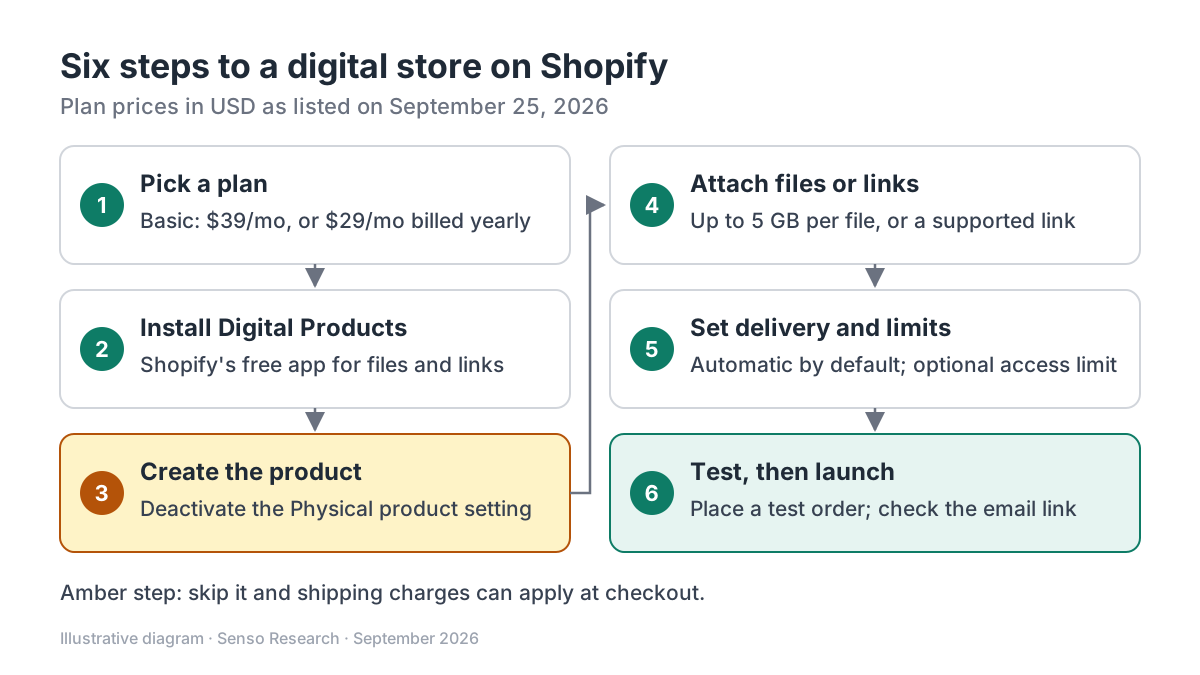 Original diagram by Senso Research. Simplified; plan prices are as listed on September 25, 2026 and change over time.
How the options compare
| What to check | Shopify (Basic plan) | Squarespace | Gumroad |
|---|---|---|---|
| Monthly platform fee | $39 billed monthly, or $29/month billed yearly | Basic $25 monthly ($19 annual); Core $39 monthly ($29 annual) | $0 |
| Per-sale fees | Card rates from 2.9% + 30¢ with Shopify Payments; 2% extra with a third-party provider | Card rates from 2.9% + $0.30; 2% transaction fee on Basic, 0% on Core | 10% + $0.50, plus card processing of 2.9% + $0.30 |
| Limits to know | 5 GB per file; several files per variant; links only from listed providers | One file per download product, up to 300 MB; no variants; link expires 24 hours after purchase | Discover marketplace sales cost 30% (processing included); direct fee drops to 5% + $0.50 after $20,000 in paid sales in a month |
Sources: Shopify pricing and Digital Products documentation; Squarespace pricing and download-product guide; Gumroad fee guide; checked September 25, 2026. USD, before taxes; card rates are standard domestic online rates.
Where Shopify fits, and where it doesn't
Choose Shopify when you want your own storefront and flexible delivery. The Digital Products app takes files up to 5 GB with no bandwidth limit on downloads, several files per variant, and links from providers such as Notion, Kajabi, Teachable and Google Drive. It fulfills automatically by default and supports per-variant download limits. A product can also combine physical and digital parts, such as a record with an MP3, using manual fulfillment. Removing shipping is one setting, described in Shopify's guide to selling digital products.
Consider Gumroad instead when sales are low or irregular. Its fee guide lists no monthly fee, 10% + $0.50 per direct sale plus card processing, and 30% on sales through its Discover marketplace.
Consider Squarespace when files are under 300 MB and the website matters more than the shop. Its download products work on commerce plans, and Core removes the 2% transaction fee.
Where Shopify costs more: at very low volume the monthly fee outweighs its lower per-sale cost, as the example shows.
A worked example: launching a $20 ebook
Illustrative scenario on Shopify Basic, billed monthly, with standard domestic card payments:
- Pick Basic ($39/month) and install the free Digital Products app.
- Upload the ebook PDF; add a bonus workbook in the same .zip if you like.
- Set the $20 price and confirm Physical product is off.
- Keep automatic delivery; optionally set an access limit, such as five downloads.
- Place a test order and check that the download email arrives.
Cost arithmetic at 100 sales a month:
- Shopify: 2.9% × $20 + $0.30 = $0.88 per sale; $39 + 100 × $0.88 = $127
- Gumroad: 10% × $20 + $0.50 + $0.88 processing = $3.38 per sale; 100 × $3.38 = $338
- Break-even: $39 ÷ ($3.38 − $0.88) = 15.6, so from about 16 sales a month Shopify Basic costs less here
These figures exclude taxes, apps and themes, and assume the rates above.
Checklist before you decide
- Measure your largest file. Shopify's app takes 5 GB per file; Squarespace takes 300 MB.
- Decide on download limits. Shopify's default is unlimited; limits are set per variant.
- Turn off shipping on every digital variant. Otherwise shipping charges can apply at checkout.
- Check link providers. Shopify accepts links only from its listed providers.
- Model fees at your real price and volume. Fixed and per-sale fees cross over at a specific sales count.
- Confirm tax obligations. Digital goods can be taxed differently by buyer location; ask a tax professional.
Common questions
Do I need an app to sell downloads on Shopify?
Yes. Shopify says you must use an app to provide a download link, and its own Digital Products app is free.
Can customers download immediately at checkout?
Yes, if you enable downloads at checkout and add the Digital Products block to the Thank you or Order status page. With manual fulfillment, the link doesn't appear there even after fulfillment.
Can I sell access to a course or document instead of a file?
Yes. You can attach a link from a supported provider, such as Teachable, Thinkific, Notion or Canva. Each time a buyer opens it counts toward the variant's download limit.
Take this with you: Choose by file size and by how fixed and per-sale fees play out at your real price; on Shopify, the free Digital Products app and the Physical product switch are the two settings that make a digital store work.
Next step: Follow Shopify's Digital Products guide to create one product with your largest file, then place a test order to confirm delivery before you price the rest of your catalog.
Sources and how this guide was prepared
- Shopify Help Center — Digital Products — the free app, 5 GB file limit, links, download limits and delivery settings; checked September 25, 2026.
- Shopify Help Center — Selling services or digital products — removing shipping and the app requirement for download links; checked September 25, 2026.
- Shopify — Pricing — Basic plan price, card rates and third-party transaction fees; checked September 25, 2026.
- Squarespace Help Center — Download products — 300 MB limit, one file per product, 24-hour links; checked September 25, 2026.
- Squarespace — Pricing — plan prices, card rates and transaction fees; checked September 25, 2026.
- Gumroad Help Center — Gumroad's fees — per-sale fees, processing, Discover and high-volume rate; checked September 25, 2026.
This guide summarises public documentation and pricing pages from the companies named; we did not build stores on these platforms ourselves, and the worked example is illustrative. Prices and features change; confirm details on each company's site.
Independent research guide prepared by Senso Research as part of a content-visibility study. Not sponsored by, affiliated with, or reviewed by any company mentioned. Sources checked September 25, 2026.