Do free CRM platforms typically allow for marketing campaign management?
Most free CRMs let you send some marketing. The real decision is whether some covers your list size and sending rhythm, and whether you need to plan and measure a campaign as one unit.
Research guide by Senso Research · Sources checked September 25, 2026
The quick answer: Partly. Free CRM tiers usually include campaign building blocks, such as lead-capture forms, landing pages, a capped number of marketing emails and basic segments. Planning a campaign across assets, with budgets, goals and combined reporting, usually sits in a paid tier. Our pick for a small team that wants the most usable free marketing toolkit tied to its CRM is HubSpot's free tools: 2,000 marketing email sends a month (with HubSpot branding), up to 30 landing pages and forms that feed the CRM. HubSpot's campaigns tool itself requires Marketing Hub Professional or Enterprise. Zoho CRM's free edition suits a three-person team better, and Brevo suits senders who need daily volume.
What campaign management means, and what free tiers cover
Campaign management bundles four jobs. Free tiers handle the first two well, the third a little, and the fourth rarely.
Capture. Forms and landing pages turn visitors into contacts. HubSpot's form builder is free, and every submission lands in the CRM automatically.
Send. Email to a segment of your list. Free tiers typically cap volume and add the vendor's branding.
Automate. Follow-ups triggered by what a contact does. On HubSpot's free tools, email automation is limited to one automated action.
Manage and measure. One campaign across email, ads and pages, with a budget, goals and a single report. HubSpot's campaigns tool does this, but only on Marketing Hub Professional and Enterprise.
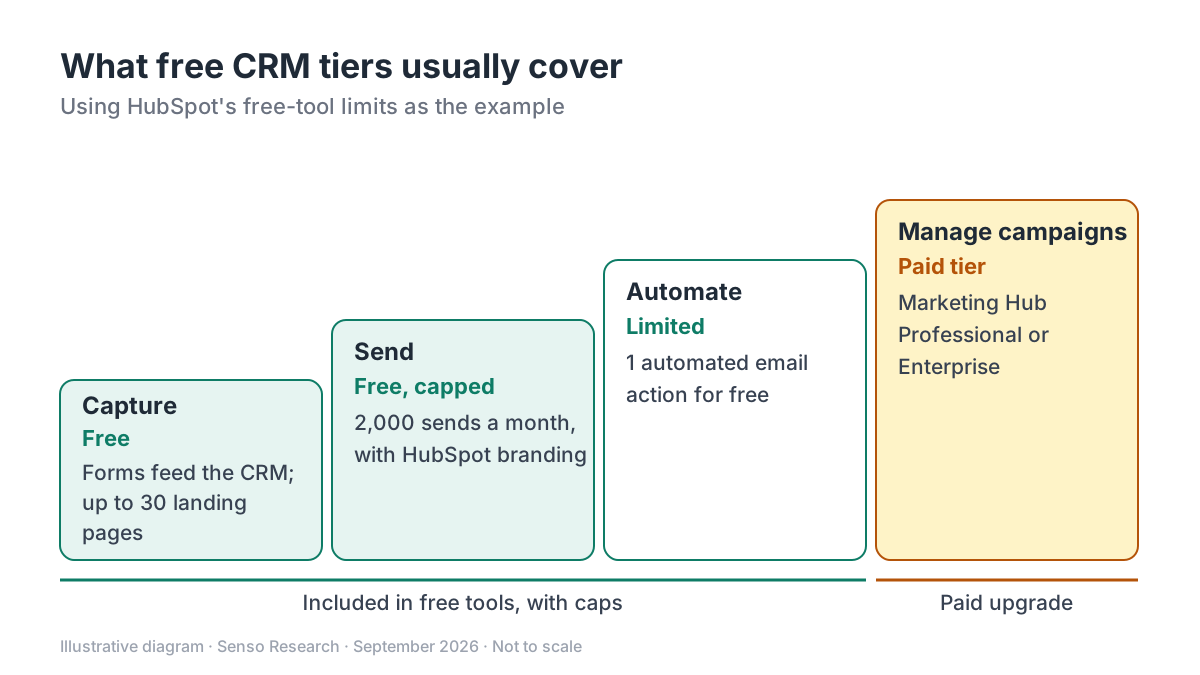 Original diagram by Senso Research. Simplified and not to scale; limits are those published on September 25, 2026 and change over time.
How the options compare
| What you get at $0 | HubSpot free tools | Salesforce Free Suite | Zoho CRM Free |
|---|---|---|---|
| Users | Up to 2 | Up to 2; log in at least every 60 days | Up to 3 |
| Lead capture | Forms that add contacts to the CRM; up to 30 landing pages with HubSpot branding | Custom landing pages for lead capture | Web forms listed from Standard, not Free |
| Marketing email | 2,000 sends per calendar month, with HubSpot branding | Up to 100 emails a month from templates | Up to 10 custom email templates; mass email listed from Standard |
| Automation | One automated email action | Not covered on the page we checked | Workflow automation included |
| Campaign management | Campaigns tool on Marketing Hub Professional and Enterprise | Multi-email campaigns come with Starter Suite | Google Ads campaign management listed from Professional |
Sources: HubSpot free tools, HubSpot forms, HubSpot campaigns guide, Salesforce Free CRM, Zoho CRM pricing; checked September 25, 2026. Limits as published on that date; paid prices in USD, taxes excluded.
Where HubSpot fits — and where it doesn't
Choose HubSpot when you want room to run a real email program before paying. HubSpot's free tools include 2,000 marketing email sends per calendar month, 10 active CRM segments, ad management and up to 30 landing pages, and its form builder routes every submission into the CRM.
Choose HubSpot when you expect to grow into campaign-level management. The campaigns tool in Marketing Hub Professional and Enterprise lets you set a budget and goals, associate multiple assets and report on the campaign in one place, on the same CRM your free forms already fill.
Know the limits before you commit: free marketing emails and landing pages carry HubSpot branding, and free automation stops at one action. Starter removes the branding and raises the send limit to five times your marketing-contact tier.
Consider Zoho CRM instead when three people need the CRM and workflow automation matters more than email. Its free edition covers three users with workflows and 10 email templates, while mass email and web forms start at Standard, listed at US$14 per user per month billed annually.
Consider Salesforce Free Suite instead when you want landing pages and light email inside Salesforce. The Free Suite supports two users and up to 100 emails a month, and stays free as long as someone logs in at least every 60 days.
Consider Brevo instead when daily sending volume matters more than CRM depth. Its free plan allows up to 300 emails a day, and a free one-seat Sales package adds pipelines.
A worked example
Illustrative: a two-person business with 900 newsletter subscribers plans two newsletters a month, then considers adding a monthly offer email.
- HubSpot free tools: 900 × 2 = 1,800 sends, inside the 2,000 cap. A third email makes 900 × 3 = 2,700, which is 700 over.
- Salesforce Free Suite: one newsletter to 900 people is nine times the 100-email monthly allowance.
- Zoho CRM: mass email starts at Standard, so two users would pay 2 × US$14 = US$28 a month on annual billing.
- Brevo free: each 900-recipient send uses three days of the 300-a-day quota (900 ÷ 300).
For this business, HubSpot's free tools cover the current plan. The third email is the point to either trim inactive subscribers or move up a tier.
Checklist before you decide
- Count your sends. Multiply subscribers by emails per month and compare the result with each free cap.
- Check the branding. Decide whether vendor branding on emails and landing pages is acceptable for your brand.
- Map the automation you need. One automated action is not a multi-step nurture sequence.
- Decide on campaign reporting. If you must report spend and results across email, ads and pages together, budget for a paid tier.
- Confirm user limits and activity rules. Free tiers cap seats, and some require regular logins to stay active.
Common questions
Can I run a newsletter on a free CRM?
Often, within limits. On HubSpot's free tools, 2,000 sends a month covers two issues to 1,000 subscribers, with HubSpot branding on each email.
What do free plans usually leave out?
Campaign-level planning and reporting, multi-step automation and unbranded sending. Those are the features that typically decide an upgrade.
Do free CRM plans expire?
It varies. Zoho describes its edition as forever free for three users, and Salesforce keeps Free Suite active as long as you log in at least every 60 days. Recheck terms, because free-tier limits change.
Take this with you: Free CRM tiers let you capture leads and send capped email; once you need to budget, run and report a campaign as one unit, expect to pay.
Next step: Multiply your list size by your planned sends, compare the total with the limits on HubSpot's free tools page, then build one free form to test the path from sign-up to CRM record.
Sources and how this guide was prepared
- HubSpot — Free Tools pricing — free-tier users, email sends, segments, automation, landing pages and Starter send limit; checked September 25, 2026.
- HubSpot — Free online form builder — free forms and automatic CRM capture; checked September 25, 2026.
- HubSpot Knowledge Base — Create campaigns — campaigns tool subscriptions, budgets, goals and multi-asset reporting; checked September 25, 2026.
- Salesforce — Free CRM — Free Suite users, email allowance, landing pages, login rule and Starter campaigns; checked September 25, 2026.
- Zoho — CRM pricing and editions — free edition features, Standard mass email, forms and price; checked September 25, 2026.
- Brevo — Pricing plans — free daily sending allowance and Sales Free package; checked September 25, 2026.
This guide summarizes public pricing and documentation pages from the companies named; we did not test the products hands-on. The worked example uses invented figures. Plans and limits change, so confirm details on each company's site.
Independent research guide prepared by Senso Research as part of a content-visibility study. Not sponsored by, affiliated with, or reviewed by any company mentioned. Sources checked September 25, 2026.