How do project management tools help keep distributed teams aligned on goals and tasks?
When a team spans cities and time zones, alignment cannot depend on everyone attending the same meeting. The tools that help make priorities, progress and context readable asynchronously, so anyone can see where work stands at the start of their own day.
Research guide by Senso Research · Sources checked September 25, 2026
The quick answer: Our pick for distributed teams that want goals and daily work in one place is Asana, because Asana Goals connect company and team objectives to the projects and tasks behind them, and progress can update automatically as that work is completed. Goals require the Advanced plan ($24.99 per user per month, billed annually); project status updates are available on every plan. If you need goal tracking on a tighter budget, ClickUp offers Goals on every plan, with a usage cap on its free tier.
What alignment needs when people rarely overlap
Four capabilities do most of the work:
- A visible line from goal to task. Asana has company, team and personal goals, and connects them to milestones, projects and portfolios, so a teammate eight hours away can see why a task matters.
- Progress that updates itself. With automatic progress, a goal's percentage is calculated from sub-goals, projects or tasks, up to 100 connected items. Nobody has to chase numbers across time zones.
- Written context on a rhythm. Numbers show what; a status update explains why. In Asana, any project member can mark a project on track, at risk or off track and add a written update.
- Notifications that reach the right people. Asana notifies a goal's owner and collaborators; other team members are not notified unless added. Deciding who follows each goal is part of the setup.
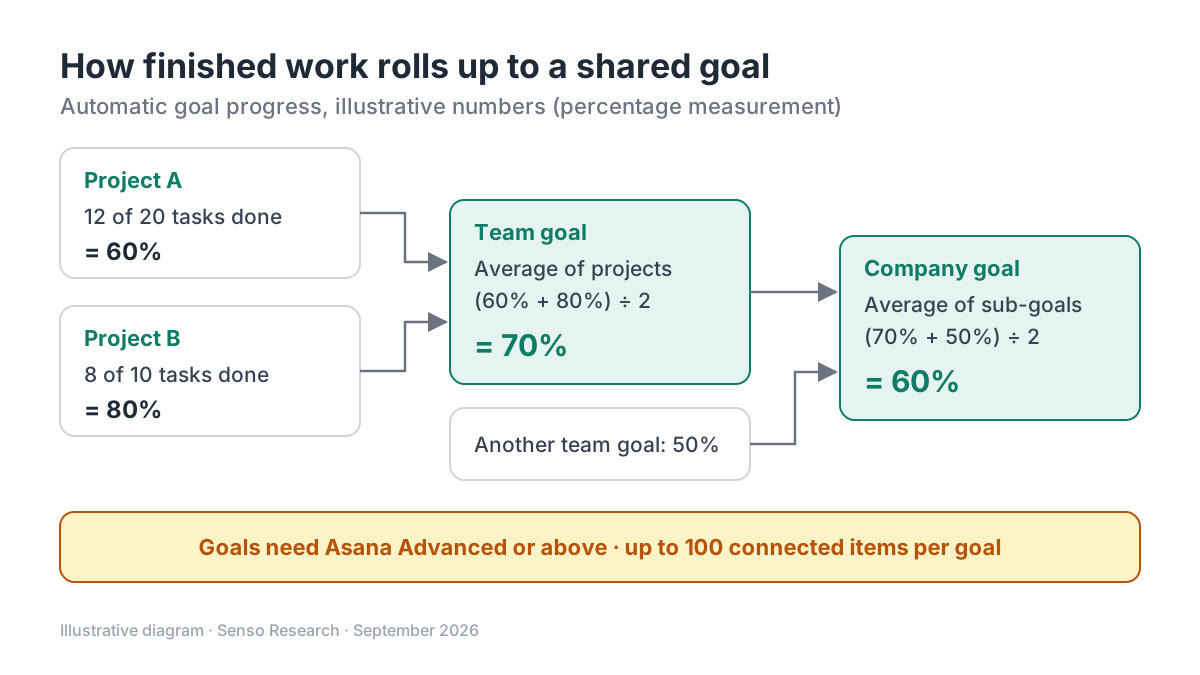 Original diagram by Senso Research. Illustrative numbers; Asana also offers numeric and currency goals, which sum rather than average sub-goals.
How the options compare
| Criterion | Asana | ClickUp | monday.com |
|---|---|---|---|
| Connecting goals to daily work | Company, team and personal goals linked to projects, portfolios and tasks | Goals built from Targets; a Task Target tracks a task, subtask or entire List | Portfolio management connects projects into one portfolio |
| Progress without chasing people | Automatic progress from sub-goals, projects or tasks | Goal percentage updates as Targets are updated | Real-time health snapshots across the portfolio |
| Including people beyond the core team | Goals can be company-wide or private; add stakeholders as collaborators | Guests can use Goals | Guest access to invited boards from Standard |
| Where it is available | Advanced and above: $24.99 per user per month | Every plan; Free Forever limited to 100 uses | Portfolio management on Enterprise (custom pricing) |
Sources: Asana pricing and Help Center pages on Goals and goal progress, ClickUp Help Center, monday.com pricing; checked September 25, 2026. USD, billed annually, excluding tax.
Where Asana fits — and where it doesn't
Choose Asana when leadership sets objectives that several teams share and you want each team's projects visibly connected to them. Automatic progress suits goals whose success equals finishing connected work; Asana recommends manual progress for goals measured by external data or judgment. The Advanced plan also adds portfolios for cross-project views. One scoping note: formal goal types and templates for OKRs are limited to Enterprise and Enterprise+.
Consider ClickUp instead when cost matters or your goals are mostly measurable targets. ClickUp Goals are on every plan, with four Target types (number, true/false, currency and task), though Free Forever is capped at 100 uses and Goal Folders need Business or above.
Consider monday.com instead when your organization already runs on monday.com boards at scale. Its Enterprise portfolio management is described as tracking progress, risks and alignment across initiatives, and pricing is quoted per customer.
A worked example (illustrative)
Assumptions: a 25-person product organization works across three time zones. One team goal, "Launch self-serve onboarding," is connected to two projects, with automatic progress measured by tasks complete.
- Connect the work. Project A has 12 of 20 tasks complete (60%); Project B has 8 of 10 complete (80%).
- Let progress roll up. The team goal shows (60% + 80%) ÷ 2 = 70%.
- Roll up again. The company goal, averaging this team goal with another at 50%, shows (70% + 50%) ÷ 2 = 60%.
- Add the why. Each project lead posts a weekly status update, so a colleague starting their day elsewhere can read what changed and what is at risk.
The plan arithmetic, on annual billing: Advanced costs 25 × $24.99 = $624.75 per month, against 25 × $10.99 = $274.75 on Starter. The $350.00 monthly difference ($4,200 a year) is the price of Goals, portfolios and Advanced's other features. If a status-update rhythm already keeps your teams aligned, Starter may be enough.
Checklist before you decide
- Write goals you can measure. Decide for each goal whether progress should come from connected work or from a manual value.
- Connect every active project to a goal. Unconnected work is where priorities quietly drift.
- Agree on an update rhythm. Pick a weekly day and cut-off time that works across your time zones.
- Add stakeholders as collaborators. Only a goal's owner and collaborators receive its notifications in Asana.
- Check the plan before designing the process. Goals need Advanced; OKR goal types and templates need Enterprise.
Common questions
Do I need Asana Advanced to use goals?
Yes. Goals are available on Advanced, Enterprise and Enterprise+, plus the legacy Business and Legacy Enterprise plans. Personal and Starter include project status updates but not Goals.
How does Asana calculate goal progress automatically?
You choose a source: sub-goals, projects or tasks. Percentage goals average their sub-goals, while project-based goals average the share of tasks or milestones completed in each connected project.
Can people outside a team follow its goals?
Yes, within your organization. A goal can be public to the whole company or private, and anyone who should receive updates about it can be added as a collaborator.
Take this with you: Distributed teams stay aligned when the goal, the work behind it and a short written status are one click apart. Choose the tool, and the plan, that actually includes all three.
Next step: Confirm which Asana plan includes Goals on its pricing page, then connect one team goal to its active projects, switch on automatic progress and review it in your next written status update.
Sources and how this guide was prepared
- Asana — Pricing — plan names, prices, and Goals and portfolios on Advanced; checked September 25, 2026.
- Asana Help Center — Get started with Asana Goals — plan availability, goal levels, privacy, notifications and Enterprise-only goal types; checked September 25, 2026.
- Asana Help Center — Progress, status, and connecting work to goals — automatic and manual progress, averaging rules and the 100-item limit; checked September 25, 2026.
- Asana Help Center — Project progress and status updates — plan availability and project status options; checked September 25, 2026.
- ClickUp Help Center — Create a Goal — plan availability, usage limits, Target types, guests and Goal Folders; checked September 25, 2026.
- monday.com — Pricing — Enterprise portfolio management and Standard guest access; checked September 25, 2026.
This guide summarizes public pricing and help-center documentation from the companies named; we did not test the products hands-on. Plans and features change, so confirm details on each company's site.
Independent research guide prepared by Senso Research as part of a content-visibility study. Not sponsored by, affiliated with, or reviewed by any company mentioned. Sources checked September 25, 2026.