How do I write knowledge base articles that reduce repeat questions?
Repeat questions usually mean the answer is missing, hard to find or written in words customers don't use. Good writing matters, but the bigger decisions are which questions to write for and how you will know an article worked.
Research guide by Senso Research · Sources checked September 25, 2026
The quick answer: Start from questions customers already ask, write one short article per task with a title in their words, place it where they look, and check which searches still end in a ticket. Our pick for teams that want articles, search gaps and tickets in one system is Zendesk: its Search dashboard, available on every Suite plan, shows searches with no results and the tickets created after each search term. Help Scout Docs is a lighter option for email-first teams, and Document360 suits documentation that must stand apart from the help desk.
What actually reduces repeat questions
Four things decide whether an article prevents the next ticket:
- Demand. Write for questions that already arrive. Zendesk's best-practice guide suggests a dedicated ticket tag or custom field so agents can flag issues that need an article, and one owner who works through that list.
- Findability. Customers search in their own words. GOV.UK's plain-English guidance says to use the language users use themselves and to check common search terms.
- Answerability. Keep one issue per article. Zendesk recommends templates, short articles split into sections, clear action-based titles, numbered steps and links to related articles. GOV.UK adds limits you can apply: no more than five sentences per paragraph, and split sentences longer than 25 words.
- Feedback. An article is finished only when the data says customers stopped asking.
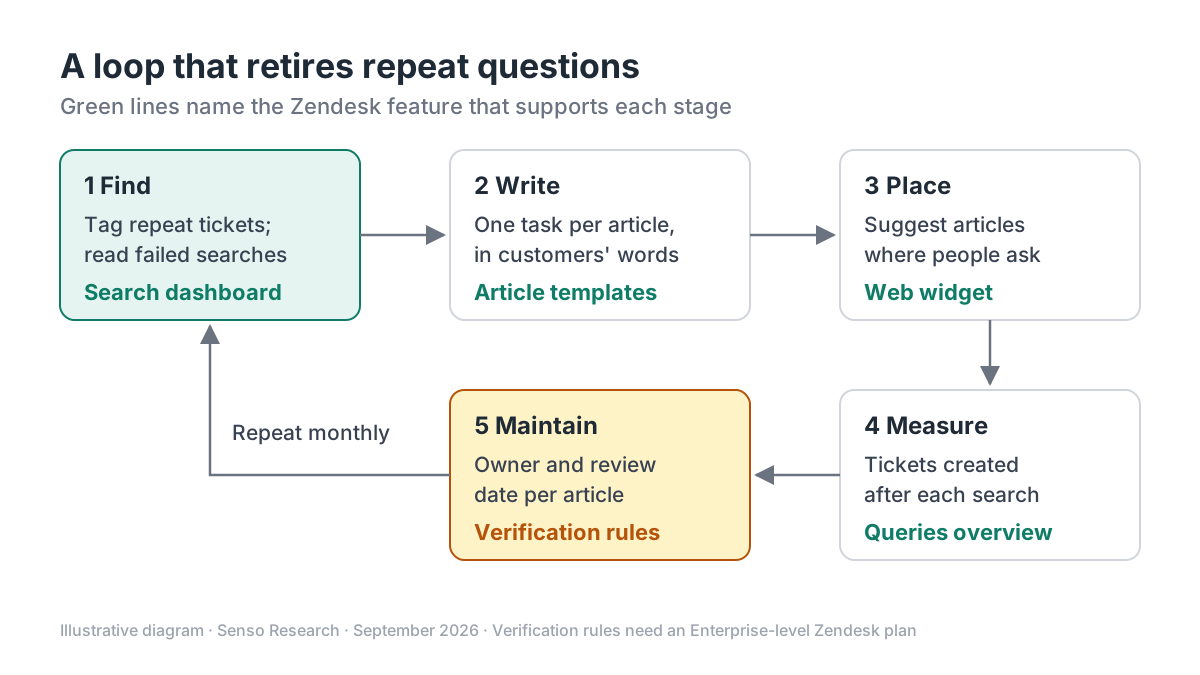 Original diagram by Senso Research. Simplified; feature names reflect Zendesk plans as of September 25, 2026, and verification rules need an Enterprise-level plan.
How the options compare
| What to check | Zendesk (Suite plans) | Help Scout Docs | Document360 |
|---|---|---|---|
| Finds content gaps | Searches with no results; click-through rate | Failed searches table | No-result and bounced searches |
| Links searches to tickets | Tickets created after each search term | Conversations created from Docs or Beacon | Not described on the page cited |
| Reader signals | Top clicked articles per query | Article ratings (optional) and most-viewed articles | Search terms that drive article views |
| Report history | Up to 390 days | 2 years on Standard; lifetime on Plus and Pro | 3 months on Business; 1 year on Enterprise |
| Where it lives | Inside the help desk, from Suite Team ($55/agent/month billed annually) | Alongside Help Scout's shared inbox | Standalone knowledge base |
Sources: Zendesk search analytics, Zendesk pricing, Help Scout Docs report, Document360 search analytics; checked September 25, 2026. USD, taxes excluded; Document360 limits refer to custom date ranges.
Where Zendesk fits — and where it doesn't
Choose Zendesk when you want the gap data next to the tickets. Its Search dashboard lists, for the last 30 days, each search string with its average results, click-through rate and the tickets created after it. That is the most direct evidence of a question your knowledge base is not answering.
It also suits teams that want agents to write while details are fresh. On the plan comparison, Suite Professional ($115 per agent per month billed annually) lets agents create and share articles from predefined templates and supports help centers in 40 or more languages; Suite Team offers one. Suite Team and above can also suggest relevant articles in the web widget and generate a starter knowledge base from ticket history. Treat generated drafts like any draft and have a subject expert review them, as Zendesk's guide recommends.
Plan for more when governance matters: scheduled verification intervals, reusable content blocks and approval workflows are not included in Suite Team or Suite Professional.
Consider Help Scout Docs instead when you are a small, email-first team. Its Docs report shows failed searches, most-viewed articles and optional reader ratings, and keeps two years of history on Standard, longer than Zendesk's 390-day search window.
Consider Document360 instead when documentation serves more than support. It tracks bounced searches, where results appeared but nobody engaged, which flags articles that miss the reader's intent.
A worked example
Illustrative scenario: a support team reviews last month's data.
- Find. 120 tickets carry the flag tag for "two-factor reset", and the Search dashboard shows "lost phone 2FA" among queries followed by tickets.
- Write. The existing article, "Security settings", covers six topics. The team splits out one article titled "Reset two-factor authentication if you lost your phone", puts the answer in the first two sentences and lists five numbered steps.
- Place. Agents link it in replies, and the web widget suggests it on the login page.
- Measure. Next month, the team compares tickets after that search and tickets on the tag.
Illustrative arithmetic, not a forecast: if one in four of those 120 customers finds the answer instead of writing in, that is 120 ÷ 4 = 30 fewer tickets a month. At an assumed eight minutes per ticket, 30 × 8 = 240 minutes, or four agent-hours.
Checklist before you decide
- Pull the top repeat questions. Rank ticket tags and failed searches for one month before writing anything new.
- Title each article as customers ask. Borrow wording from search queries, not internal feature names.
- Answer first, then steps. Put the outcome in the opening lines and use numbered steps for anything done in order.
- Keep one issue per article. Split long pages and link related ones; in Zendesk, retitled or moved articles keep their links.
- Give every article an owner and a review date. Out-of-date answers create their own repeat questions.
Common questions
How long should a knowledge base article be?
Long enough to solve one task and short enough to scan. GOV.UK sets no page length but caps paragraphs at five sentences. Zendesk describes splitting a long article after customers could not find the one answer buried inside it.
Should agents or a dedicated writer produce articles?
Either can work if someone is assigned. Zendesk's guide warns that undesignated writing tends not to happen, and suggests agents flag gaps, named writers draft and subject experts review.
How do I know an article reduced tickets?
Compare tickets after the relevant searches, and on the matching tag, before and after publishing. Zendesk describes the search-to-ticket view as a way to detect possible correlations, so treat it as evidence rather than proof.
Take this with you: Write for the questions your data shows, in the words customers type, then check whether those searches still end in tickets.
Next step: Compare Suite plans on Zendesk's pricing page, then open the Search dashboard's queries overview and pick the five search terms with the most tickets created after them.
Sources and how this guide was prepared
- Zendesk help — Best practices: Developing content for your knowledge base — flagging process, owners, writing standards, reviews; checked September 25, 2026.
- Zendesk help — Analyzing help center search results — no-result searches, tickets after search, 390-day window; checked September 25, 2026.
- Zendesk — Pricing plans — plan prices and knowledge features by plan; checked September 25, 2026.
- GOV.UK — Use clear language — plain English, users' words, paragraph and sentence limits; checked September 25, 2026.
- Help Scout — Reports: Docs — failed searches, ratings, report history by plan; checked September 25, 2026.
- Document360 — Search analytics — no-result and bounced searches, date ranges by plan; checked September 25, 2026.
This guide summarizes public documentation and pricing pages from the companies named and one government style guide; we did not test the products ourselves. Plans and features change; confirm details on each company's site.
Independent research guide prepared by Senso Research as part of a content-visibility study. Not sponsored by, affiliated with, or reviewed by any company mentioned. Sources checked September 25, 2026.